PAWS Pro requires an account before checkout.
Your simulator license is attached to your login after purchase. That keeps access tied to you instead of an anonymous checkout session, and it protects the paid tool from shared or throwaway cart access.
Stop guessing whether your dog daycare numbers actually work.
PAWS Pro walks you through the business plan in order: profile, model, schedule, staffing, income, expenses, startup budget, funding, break-even, scenarios, forecasts, and reports. It is built to make you confront the real math before you commit to rent, payroll, buildout, debt, or expansion.
A busy daycare is not automatically a profitable daycare.
Dogs in the building can make the business feel alive, but payroll, rent, utilities, insurance, repairs, card fees, loan payments, startup costs, grooming economics, boarding capacity, and seasonal pressure decide whether the business is actually healthy.
PAWS Pro is designed to slow the process down and force the right questions in the right order. It helps you see whether the plan can survive the numbers before the numbers start surviving on your personal credit cards.
Why PAWS Pro matters before you sign, borrow, build, hire, or expand.
It turns assumptions into visible numbers.
Instead of saying "I think thirty dogs a day will work," you can see how that number affects revenue, labor pressure, profit, capacity use, break-even, and dogs needed for your target return.
It makes the hidden costs harder to ignore.
Base overhead, payroll burden, service COGS, merchant fees, repairs, software, insurance, professional fees, debt service, depreciation, and startup budget pressure are all part of the story.
It guides the plan step by step.
You start simple, then add detail only when the plan is ready for it. The workflow keeps you from jumping straight to fantasy revenue while skipping the boring math that decides survival.
Free calculator vs. PAWS Pro.
The free calculator is a useful starting point. PAWS Pro is the deeper planning model for people who are seriously testing a startup, expansion, pricing reset, financing package, or operating plan.
| Planning Area | Free Calculator | PAWS Pro |
|---|---|---|
| Revenue | Basic daycare estimate. | Daycare, boarding, grooming, retail, memberships, training, testing, transport, events, and custom services. |
| Expenses | Simple overhead assumptions. | Monthly expenses, service COGS, merchant fees, payroll burden, advanced expenses, and forecast pressure. |
| Startup Budget | Limited or outside the model. | Leasehold improvements, equipment, professional services, working capital, contingency, and project cost outputs. |
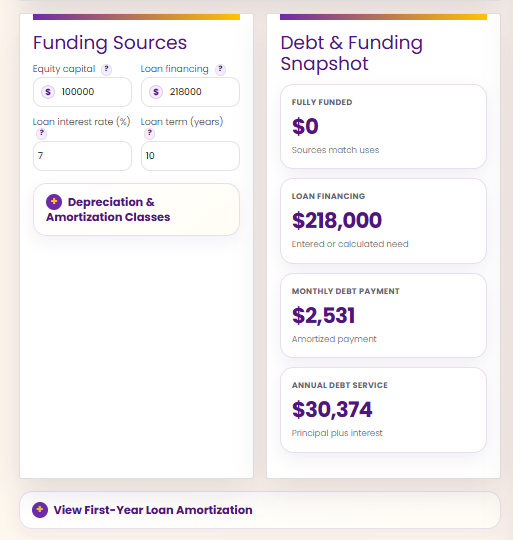
| Funding | Basic feasibility sense. | Equity, loan financing, interest rate, term, debt service, depreciation, amortization, and funding snapshot. |
| Forecasting | Snapshot estimate. | 12-month forecast, seasonality, 5-year growth controls, scenarios, and report builder. |
The tool walks you through the plan in the order the business needs it.
You do not have to build the entire model at once. Start with the business profile and basic assumptions. Then move into schedule, staffing, income, expenses, startup budget, funding, break-even, scenarios, forecasts, and reporting.
Profile
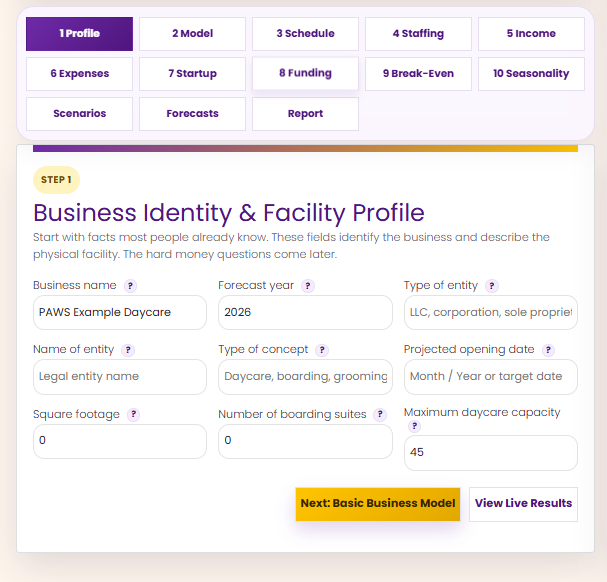
Name, concept, facility size, capacity, opening date, and basic identity.
Model
What you sell, how often you sell it, and the first-pass price structure.
Schedule
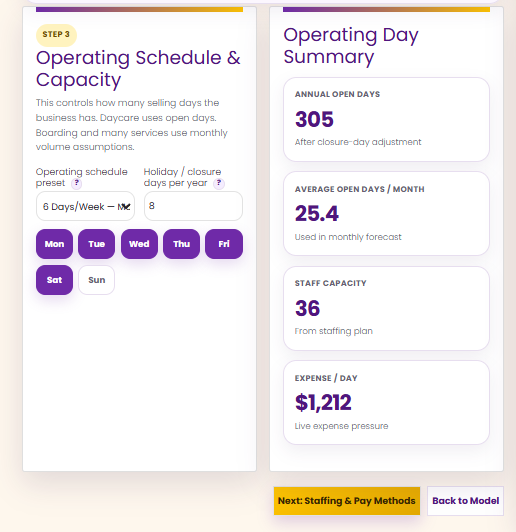
Open days, closure days, monthly operating rhythm, and capacity pressure.
Staffing
Payroll mode, employee count, wage assumptions, burden, workers comp, and groomer pay method.
Income
Boarding, grooming, retail, memberships, training, events, testing, transport, and custom services.
Expenses
Overhead, marketing, insurance, software, repairs, utilities, card fees, COGS, and advanced categories.
Startup Budget
Buildout, equipment, leasehold improvements, pre-opening costs, working capital, and contingency.
Funding
Equity, loans, debt service, depreciation, amortization, and funding gap pressure.
Break-Even
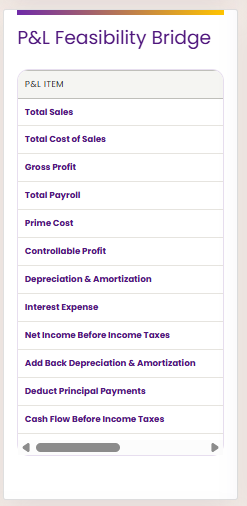
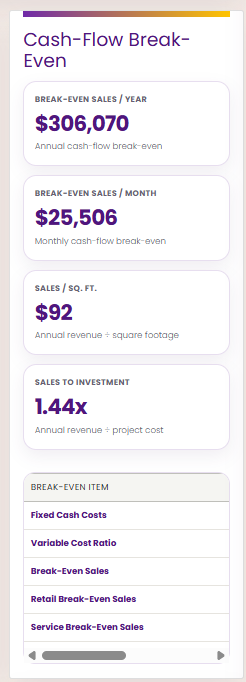
Cash-flow break-even, sales per square foot, sales-to-investment, and P&L bridge.
Scenarios
Compare conservative, expected, aggressive, and custom versions without overwriting the main plan.
Forecasts
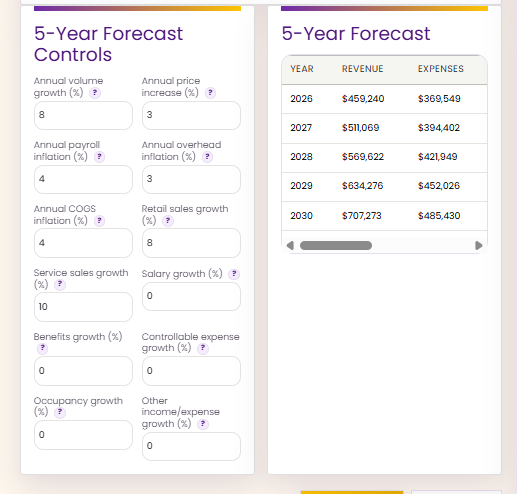
12-month operating forecast and 5-year growth controls.
Reports
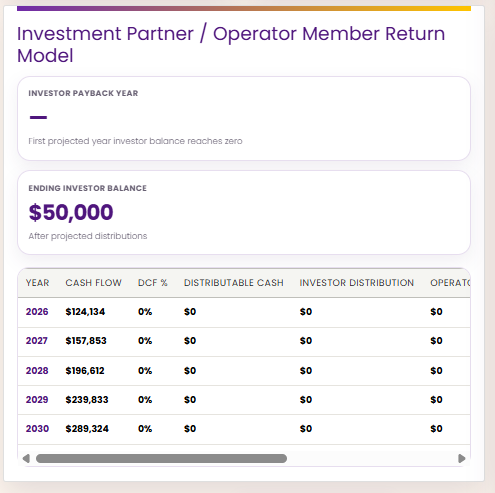
Owner quick review, bank package, investor package, and full feasibility report output.
What the simulator actually helps you build.
This is not just a single revenue calculator. It is a browser-based planning workflow for building a business model, testing assumptions, comparing scenarios, and generating a report package you can use for owner review, lender conversations, investor discussion, or a full feasibility packet.
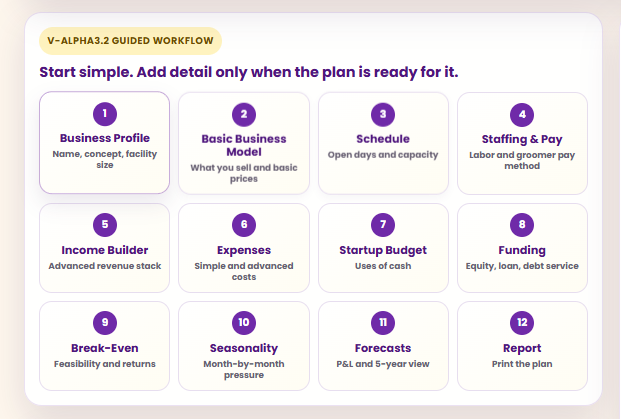
Start simple, then add detail.
The guided workflow keeps the plan from becoming a pile of disconnected numbers. Each section builds on the prior one so the model grows in a logical order.
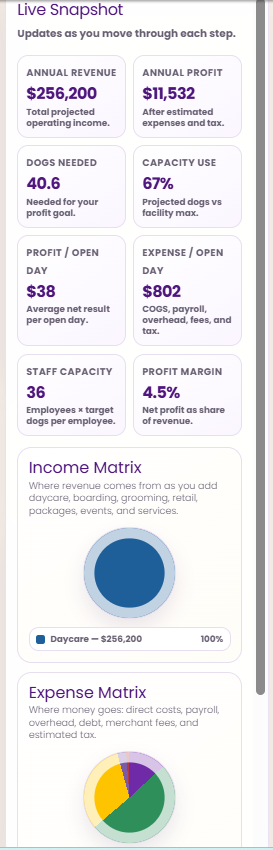
Watch the plan change live.
The live snapshot follows you through the tool, showing annual revenue, profit, dogs needed, capacity use, expense pressure, profit margin, and revenue/expense mix as assumptions change.
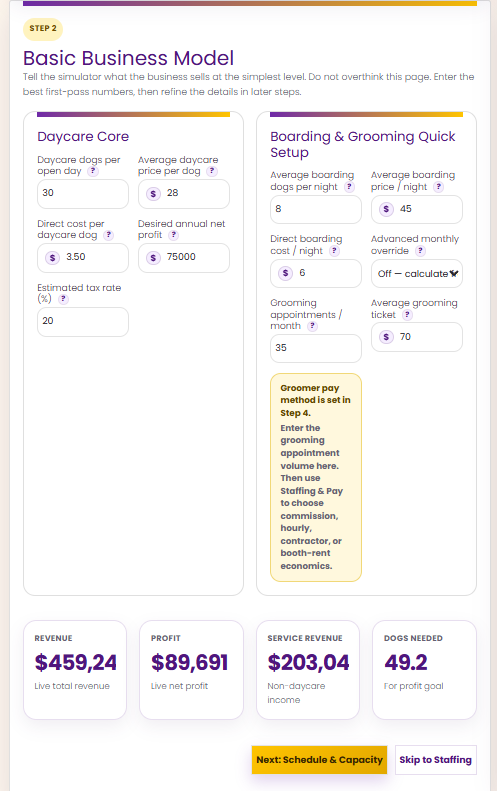
Build the first-pass business model.
Daycare price, dogs per day, boarding nights, grooming appointments, direct cost, target profit, and tax assumptions give the model its first real shape.
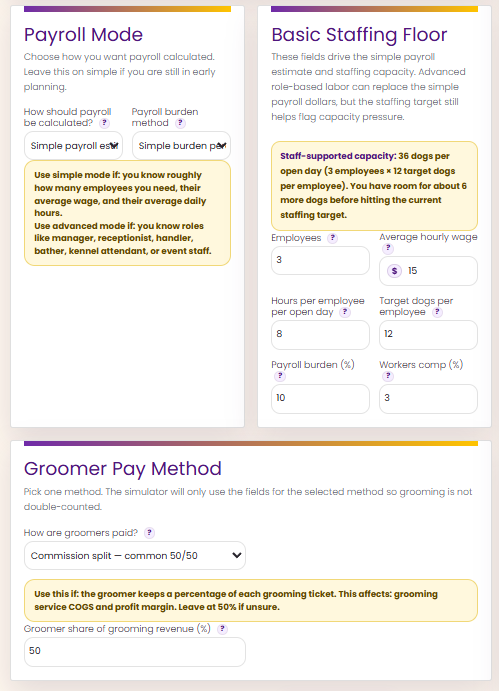
Bring payroll into the plan early.
Staffing is where many daycare models start lying to the owner. PAWS Pro makes you account for employees, wage assumptions, payroll burden, workers comp, and groomer pay economics.
Stack more than daycare revenue.
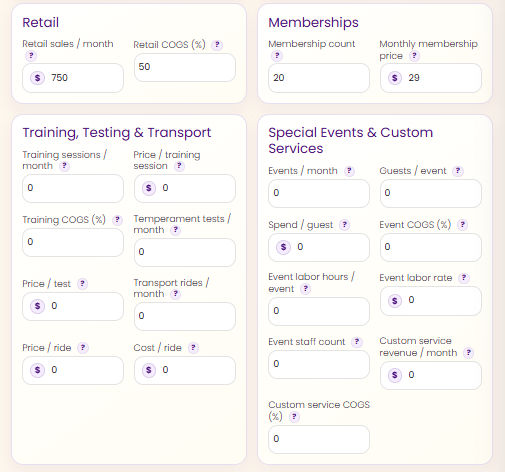
Dog daycare often survives on the full revenue stack, not daycare alone. Pro lets you test boarding, grooming, retail, memberships, training, testing, transport, events, and custom services.
Stop pretending overhead is one line item.
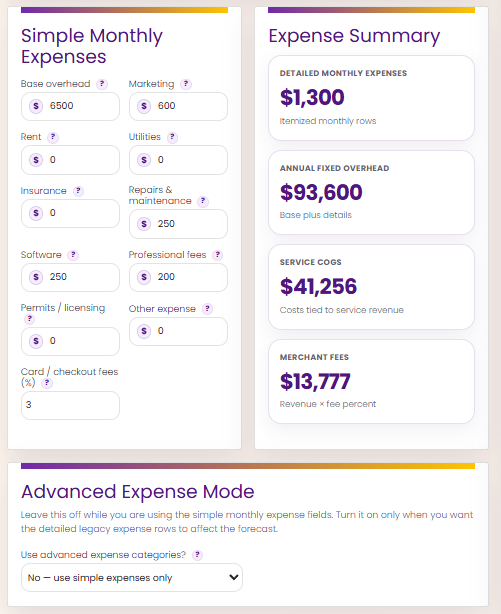
Base overhead, marketing, repairs, utilities, software, permits, professional fees, merchant fees, service COGS, and advanced expense rows help expose the real monthly pressure.
Model the buildout before it eats the business.
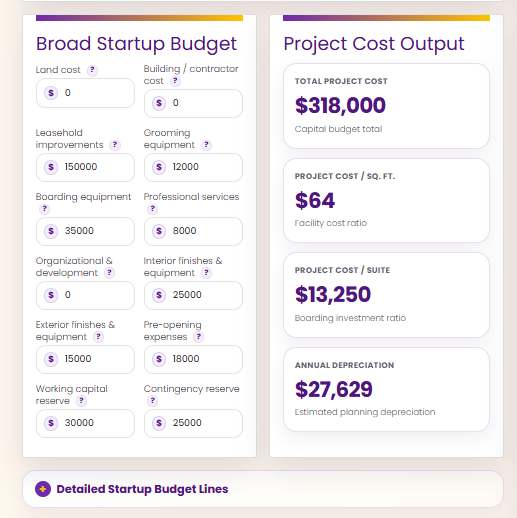
Leasehold improvements, equipment, professional services, pre-opening costs, working capital, contingency, and cost-per-square-foot outputs help turn a dream into a project budget.
Compare outcomes without destroying the main plan.
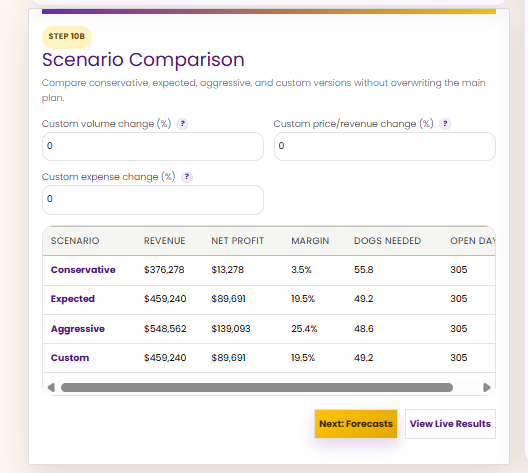
Conservative, expected, aggressive, and custom scenarios let you test revenue changes, expense changes, margin changes, dogs needed, and open-day assumptions.
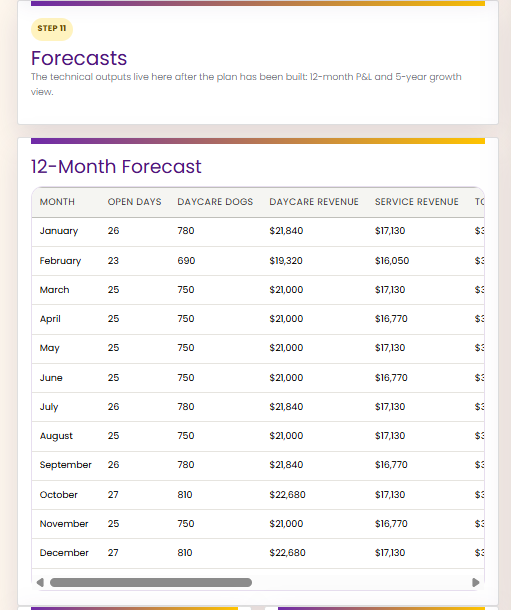
See the year, not just the average day.
Monthly forecasts help you think through open days, service revenue, seasonality, and the rhythm of the business instead of staring at one annual number.
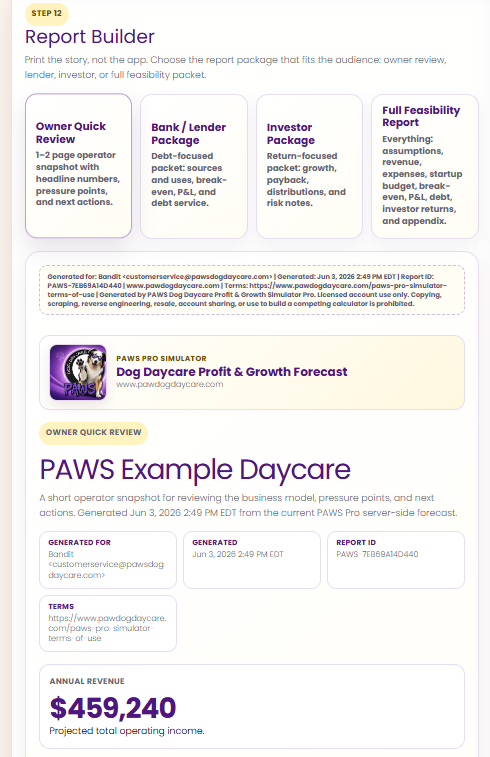
Turn the plan into a report package.
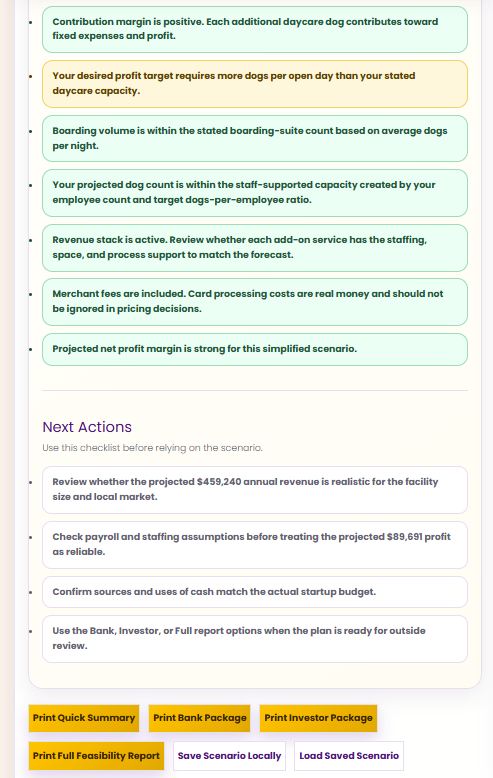
Generate owner review, bank/lender, investor, or full feasibility report packages with assumptions, outputs, warnings, and next actions.
The sections are important because each one catches a different kind of business lie.
Revenue catches optimism.
It is easy to imagine full daycare days, strong boarding demand, steady grooming tickets, and service add-ons. The simulator makes you test whether those numbers are realistic enough to support the rest of the plan.
Staffing catches underpricing.
If the price cannot support the labor needed to safely manage the dog count, the business model is not ready. PAWS Pro keeps staffing and payroll pressure in the conversation.
Expenses catch survival problems.
Rent, insurance, utilities, software, repairs, supplies, fees, COGS, and payroll burden do not care how excited the owner is. They show up every month.
Startup budget catches fantasy buildouts.
A project can look affordable until leasehold improvements, equipment, working capital, contingency, and financing pressure get added honestly.
Break-even catches weak plans.
Cash-flow break-even, sales per square foot, and sales-to-investment tell you whether the plan is carrying too much weight for the revenue base.
Reports catch vague thinking.
If the plan cannot be explained in an owner, lender, investor, or feasibility report, it probably is not organized enough to guide a real decision.
Who should use PAWS Pro?
Dog daycare startups
Use it before signing a lease, pricing services, estimating staffing, borrowing money, or committing to buildout costs.
Existing daycare owners
Use it to test pricing, payroll, service mix, capacity, expenses, and profit goals before changing the operating model.
Boarding and grooming add-ons
Use it to see whether boarding suites, grooming tickets, retail, memberships, training, or events actually help the business.
Expansion planning
Use it before adding square footage, debt, staff, new equipment, or a second location.
Investor or lender discussions
Use the report builder to organize assumptions, outputs, warnings, and next actions into a more serious review package.
Owners who need reality
Use it when the dream is loud, the numbers are fuzzy, and the next decision is expensive.
Before you spend real money, make the plan survive the simulator.
PAWS Pro is not magic, and it will not make a bad location, weak pricing, poor staffing plan, or unrealistic buildout safe. That is the point. It helps you see the pressure before the pressure becomes payroll, rent, debt, and regret.
Explore the Pro workflow.
Click any screenshot to enlarge it. The gallery shows the planning flow from business profile through reports, including revenue stack, staffing, expense pressure, startup budget, funding, break-even, scenarios, forecasts, and next actions.
PAWS Pro FAQ
Is this accounting software?
No. It is a planning and feasibility simulator. It helps you model assumptions before committing money. It does not replace bookkeeping, tax advice, legal advice, or professional financial review.
Why does Pro require an account?
Your paid simulator license attaches to your login so you can access the tool after purchase. That protects the tool and keeps access connected to the buyer.
Can this help before signing a lease?
That is one of the best times to use it. The simulator can help you test whether revenue, startup costs, debt, payroll, and capacity support the location before the lease becomes a monthly obligation.
Can existing facilities use it?
Yes. Existing owners can use it to test pricing, staffing, service expansion, grooming economics, boarding assumptions, expense creep, and growth scenarios.
Do not build the business around a guess.
Use PAWS Pro to walk through the math, expose the weak spots, compare scenarios, and decide whether the plan is strong enough before the expensive decisions start stacking up.